
On this page
A marketing campaign researched by AI agents and set up for launch by AI agents
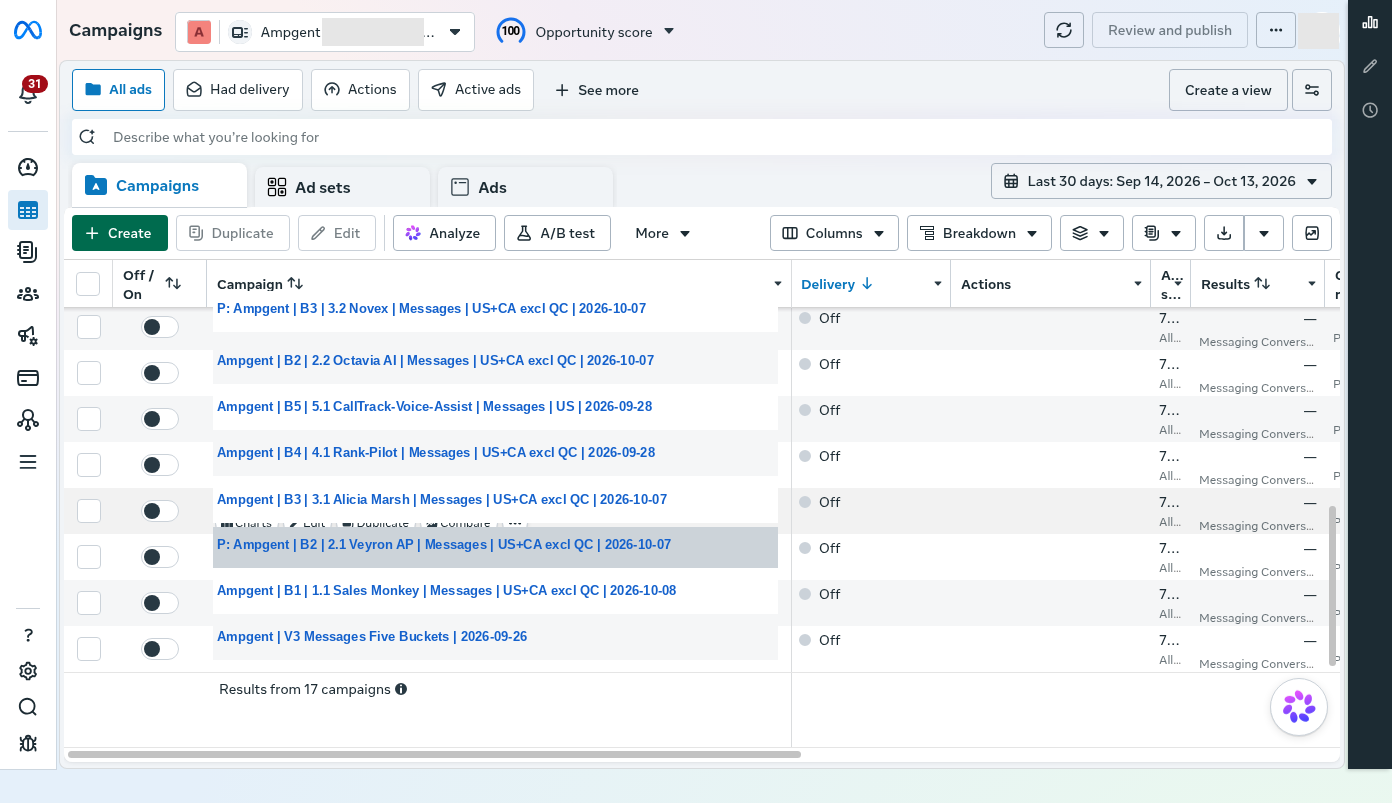
It was October, and we were looking at Meta Ads Manager. Weeks of research, creative work and technical setup were behind us. The new campaigns were built, but paused. The performance columns were empty.
That was our cue to document everything.
Most marketing case studies start with a winning ad or an impressive return on investment. Ours starts before the first meaningful result. We wanted a record of what we believed, what the agents did, what the software was set up to do and what we still didn't know. Once results arrive, it is surprisingly easy to remember those details wrongly.
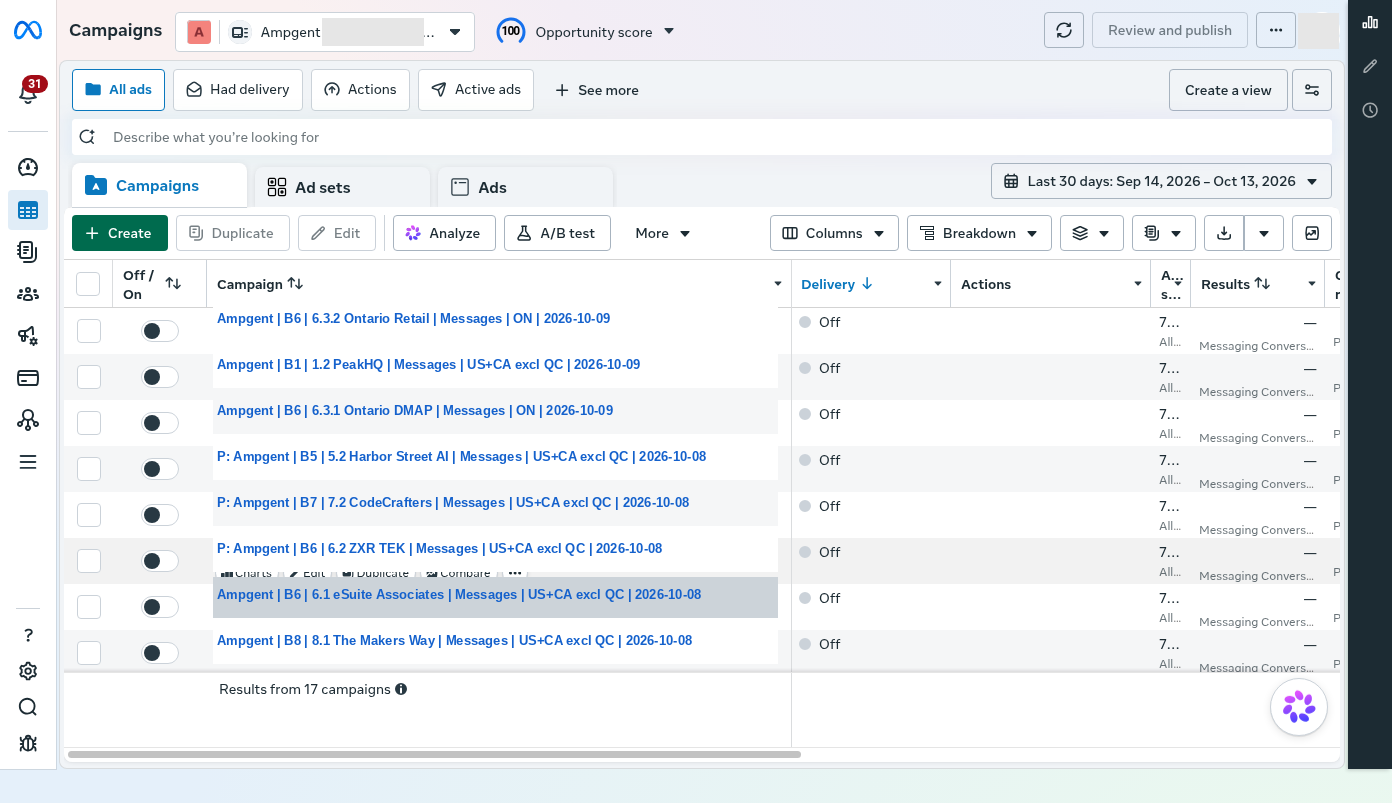
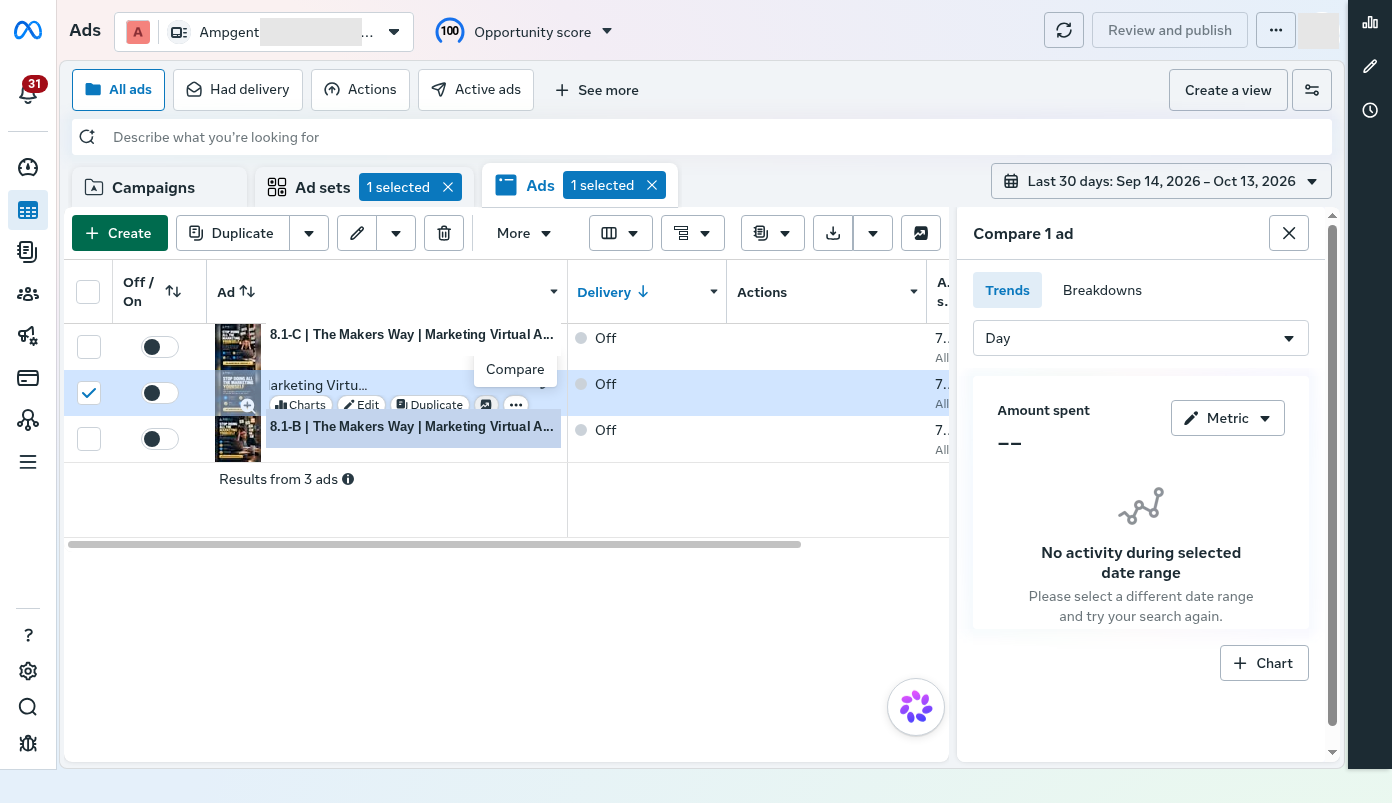
A second view recorded the remaining rows. A supporting Meta API check found 17 paused campaigns in the staged portfolio. The displayed rows for the new experiment showed no delivery, spending or impressions. This did not mean the ad account had never been used. A separate, older campaign had spent CAD 41.42 over its lifetime.
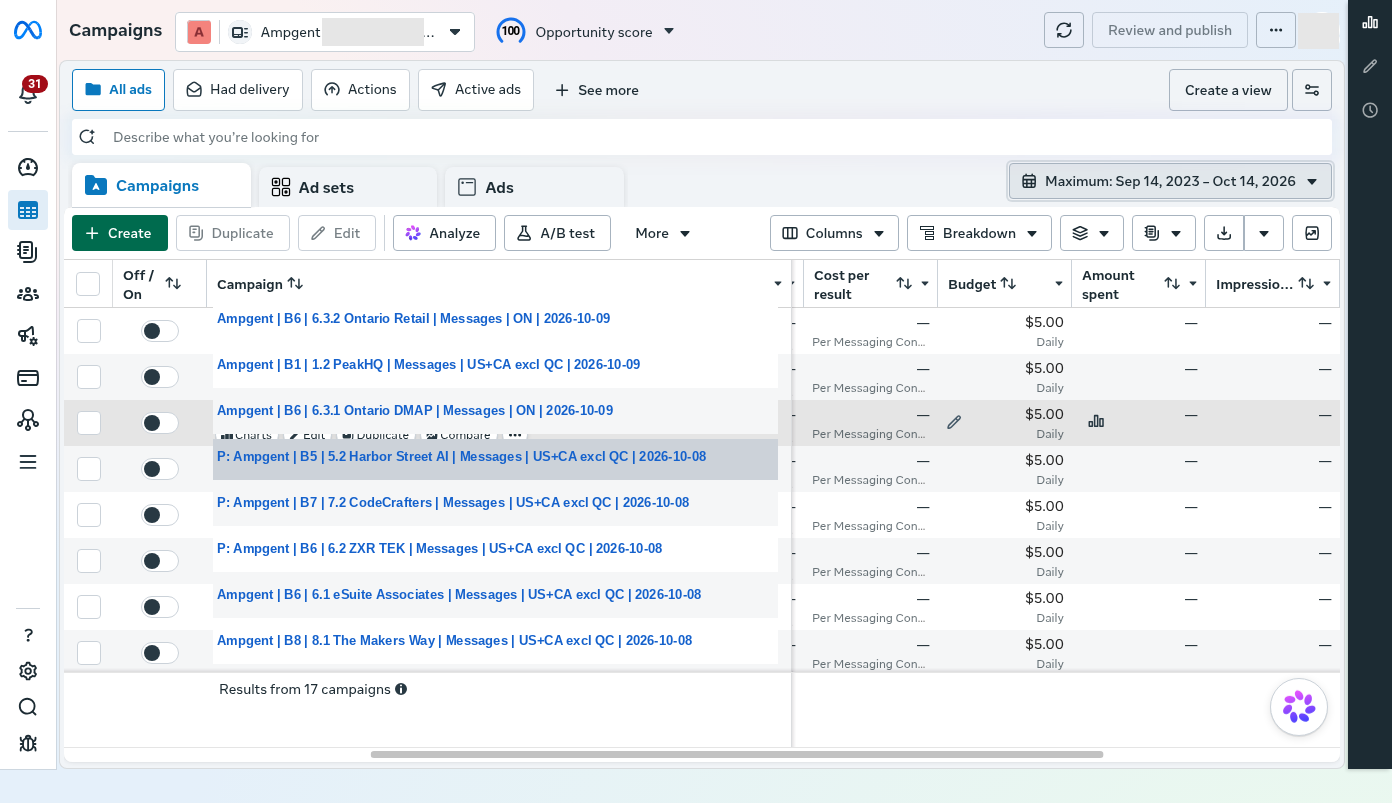
There were eight business categories, but that did not mean eight ads. Each category was a hypothesis about a customer problem, and some held several offer directions and creative variants. We had built the machinery to start learning. We had not found a winning offer, a profitable cost per lead or a return on spend.
This article is the story of how we got to that point.
The business problem was choosing what to sell first
Ampgent works across AI tools, implementation, learning and staffing. For a small business, that range raises an uncomfortable question: which problem should we take to market first?
We could advertise AI agents that answer inbound inquiries, software that automates office work, specialists who set up AI tools, training for aspiring consultants, or human assistants who take marketing work off an owner's plate. Each option is plausible. Each attracts a different buyer. Each creates a different delivery obligation.
Choosing one ideal customer before testing these ideas would have felt tidy. But tidy is not always correct.
Our early research looked at service businesses, AI automation operators, agencies and consultants. One principle kept coming back: buyers pay to solve recognizable problems, not merely to own AI. A missed customer call, an overflowing support inbox or an engineering backlog is easier to explain than a general promise of “AI transformation.”
We also separated an attractive entry offer from a viable business behind it. A free consultation can start conversations without ever producing a paying customer. A specialized implementation project might draw fewer inquiries but lead to a valuable recurring engagement. We needed evidence of both demand and commercial fit.
So we chose a portfolio of offer tests. This was an exploration exercise, not a scientifically controlled eight-way experiment. With small daily budgets, different sales cycles and different buyers, it would be easy to mistake noise for a winner. We expected the first round to point us toward more focused tests.
What the Meta Ad Library could, and could not, teach us
Instead of asking AI to invent offers from scratch, we used the public Meta Ad Library to study what businesses were actively advertising. We were not trying to lift their identities or copy their artwork. We wanted to see how real companies described their audiences, problems, methods and calls to action.
We built a research routine around a few questions.
- What specific problem is this ad naming?
- Who appears to be the buyer, rather than merely the person likely to click?
- What is the offer, and what would the customer get next?
- Is the creative a video, still image, carousel or demonstration?
- How long has the ad appeared active, and are there related variations?
- Does the observed proposition make sense for something Ampgent could honestly deliver?
The September research records report 34 advertiser checks, 96 reconciled keyword searches and 131 deduplicated candidate offer families. Those numbers describe the research process. They do not mean we found 131 proven winners.
For broad searches, our researchers gave more weight to ads that appeared active for about 60 days. More specific searches sometimes used a shorter window. A long-running ad is worth a look, but it is only a proxy for continued advertiser activity. Public ads do not reveal acquisition cost, profitability, customer retention or the quality of the advertiser's service.
The research files held one especially useful instruction:
“Classify the ad by its actual offer, not by the keyword that surfaced it.”
A search for “AI agents” can surface courses, recruiting services, agency offers, software and consulting. A search keyword is not a reliable label for the business behind the ad.
Two mistakes forced us to improve the process
Some early text-based collection made video ads look like static cards. The team had to open the live creative to see what the ad really showed.
Other adaptations kept the general “AI” theme but lost the original buyer or problem. A narrow operational promise could dissolve into generic AI consulting. To catch this, we added a source-match review that checked the buyer, economic problem, hook, vocabulary, offer and destination separately.
That review ended up mattering more than whether a generated image looked good. If we changed the buyer and the method, we were no longer testing the same hypothesis.
We also learned to log a browser access failure as a failure. An empty result from a half-loaded Ad Library page is not evidence that nobody in the market is advertising.
We gave agents tools, not just instructions
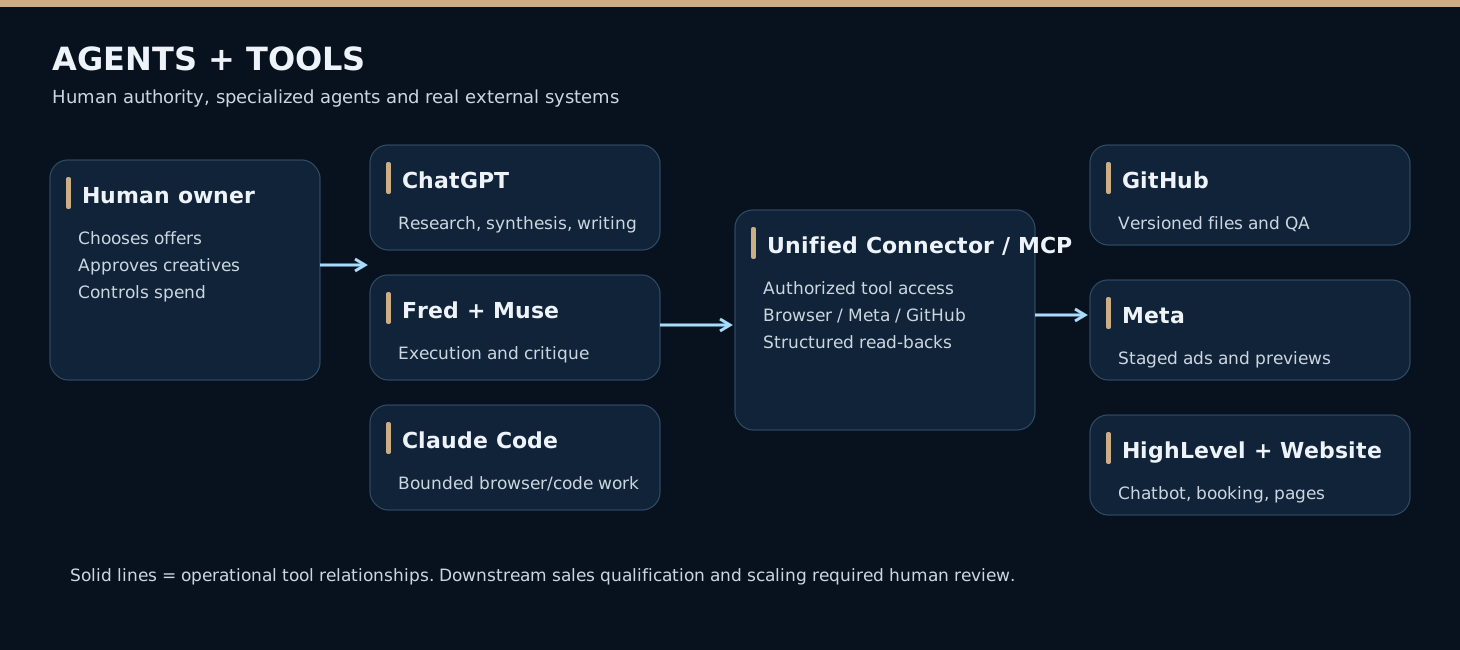
The Ad Library is a dynamic website. A language model can suggest a good research plan. But suggesting a plan is different from watching what appears in a browser, opening an advertiser's live creative or checking a Meta campaign setting.
That difference shaped our technical setup.
We used a virtual machine with a browser automation setup built on Patchright. Patchright works like Playwright, a toolkit that lets software do what a person would do in a browser: click, type and read what a site displays. Our system used Patchright to carry out those steps.
We also built a custom connection using the Model Context Protocol (MCP), which we called the Unified Connector. MCP is a standard way for AI tools to offer actions and data to AI clients. In practice, it let assistants use authorized GitHub, Meta and browser functions, so a person did not have to copy information between windows. The connector was a tool-access layer. It did not guarantee that every connected system was always available.
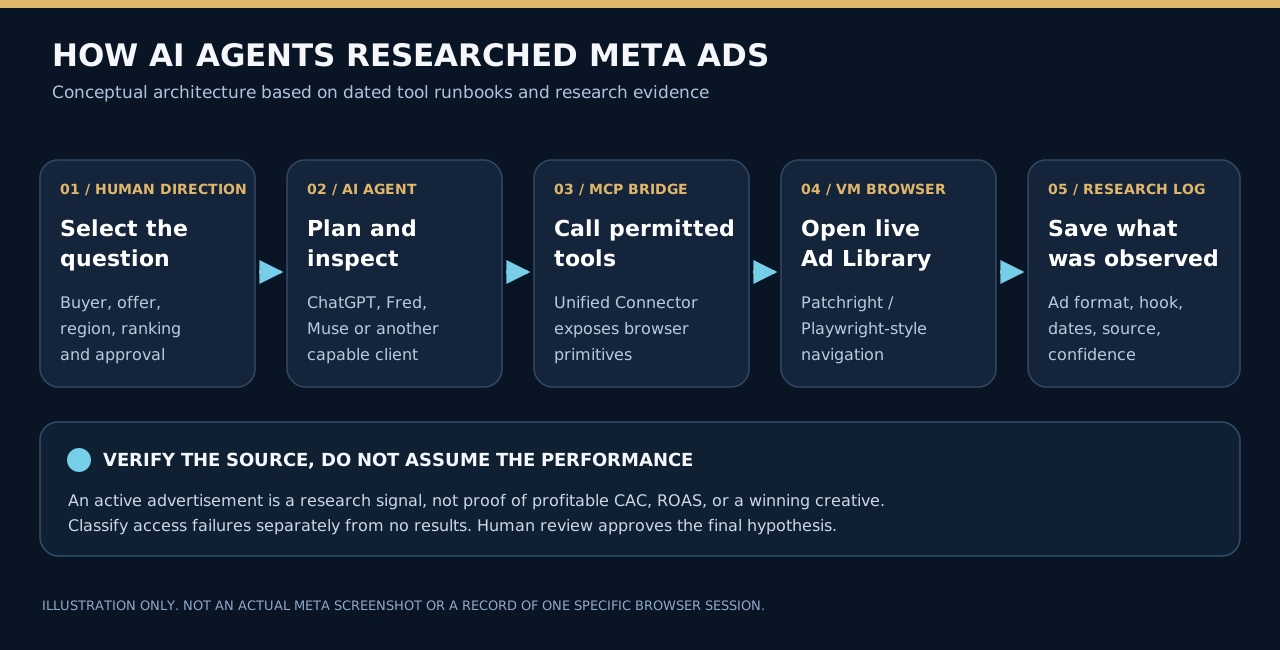
A browser agent could be asked to investigate a group of offers, inspect the visible source, save structured findings and flag anything uncertain. GitHub then kept the research notes and creative work. When an authorized Meta connection was available, tools could also create or read back campaign objects. This cut down on repetitive copying and made reviews and corrections possible.
Several AI roles contributed, but they were not interchangeable.
ChatGPT helped frame the research, compare strategies, draft copy, critique creative and tie decisions together across the project. Fred was an issue-driven technical and research executor. Muse supplied independent research and critique. Claude Code handled bounded coding and browser tasks, including recovering evidence screenshots later. Max, the internal marketing agent defined in the repository, was mostly dormant. That role is separate from the customer-facing HighLevel chatbot, which was also called Max.
For one research round, we told Fred and Muse to investigate separately before comparing findings. We wanted disagreement and gaps, not two agents repeating the same first answer. We also dropped a Grok role we had planned when access to it ended. The process adapted.
The owner made the final choices about offers, truthful claims, creative approval and spending. Agents could prepare or verify an object. They had no standing authority to decide what should run or how much to spend.
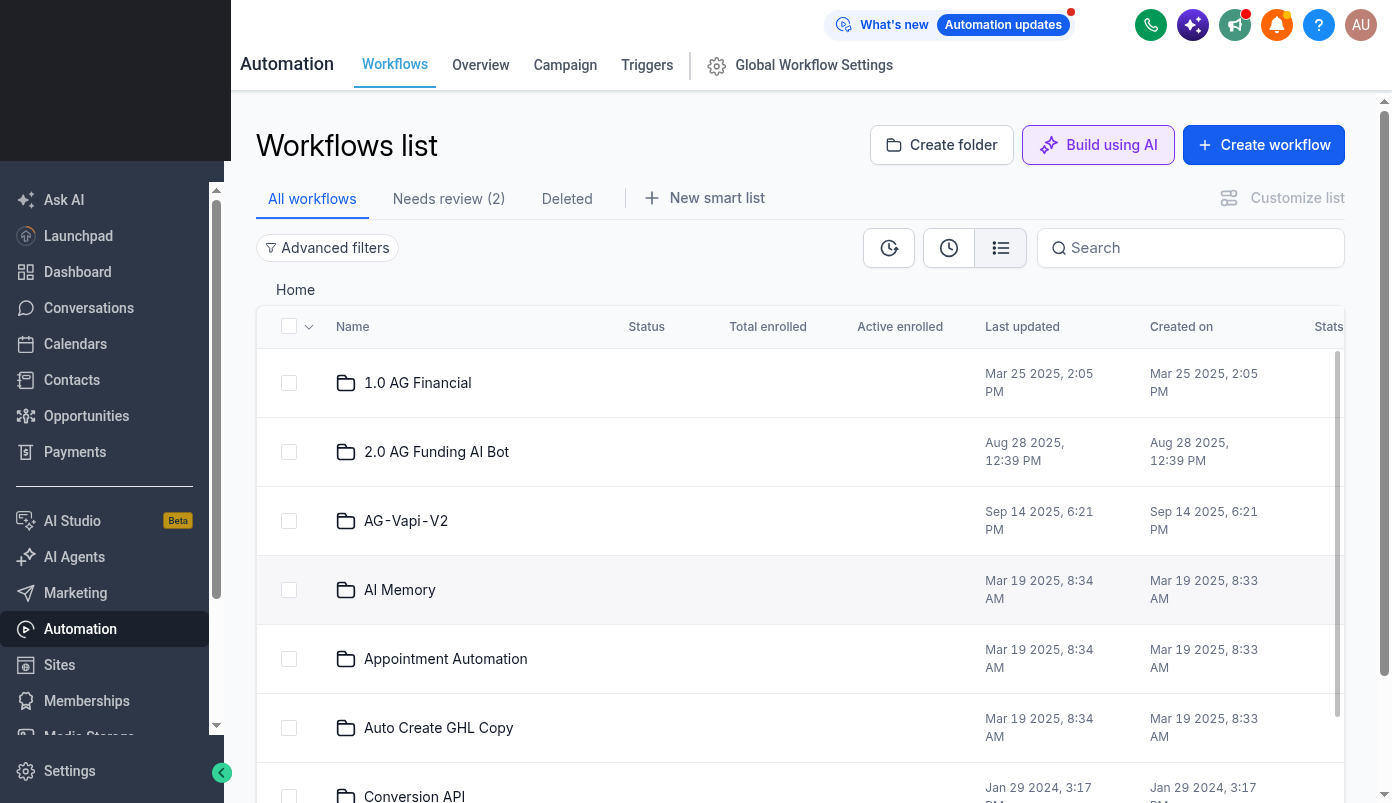
The tools still failed at times. Browsers timed out. Login and rendering behaved differently across environments. The HighLevel workflow canvas later refused to load reliably in an automated browser, even though the workflow list loaded. We documented these as blockers. We did not invent a screenshot or claim to have verified a setting we could not see.
Why the plan expanded into eight categories
We did not start with eight. Our early research used four broad groups. The first staged Meta structure had five campaign categories. Later research and owner decisions added AI adoption, embedded talent and a non-AI staffing comparison.
We gave each category a stable number. That let us connect the concept, approved copy, source notes, variants, Meta objects and later measurements across revisions.
| Category | Customer problem | Entry offers we prepared |
|---|---|---|
| 1. Business Growth | Sales teams losing or missing opportunities | Inbound lead response and qualification; outbound account research and follow-up |
| 2. Managed Internal Execution | Finance and support teams overloaded by repetitive work | Accounts payable workflows; customer support across email, chat and forms |
| 3. Learn to Earn | People seeking an AI consulting or agency income path | Practical consulting skills; packaging an offer for initial AI clients |
| 4. Cross-Cutting | Agencies and companies uncertain about AI visibility or readiness | AI-search discoverability; adoption-readiness conversations |
| 5. AI Receptionist / Inbound | Service businesses losing callers and bookings | Live call answering; missed-call follow-up |
| 6. AI Adoption / Rollout | Operators needing a plan or working implementation | Agent adoption and execution; conditional Ontario digital-adoption and retail modernization pathways |
| 7. Embedded AI Talent | Organizations short of implementation or development capacity | Dedicated AI implementation specialists; AI engineering support |
| 8. Human VA Staffing | Owners who want ongoing marketing tasks handled | Human virtual-assistant support, without an AI positioning claim |
The categories were not just eight ways to say “we do AI.”
An inbound sales agent handles inquiries a business already receives. Outbound prospecting tries to create new opportunities. Live phone answering and missed-call text-back work at different points in the customer journey. Finance automation needs different trust and system access than a consumer-facing receptionist. An AI implementation specialist is not the same as a software developer. And a marketing virtual assistant (VA) may be valuable precisely because the owner wants a person doing the work.
Category 6 needed special care. Ads about Ontario programs could attract interested businesses. But curiosity about possible funding does not prove eligibility or willingness to buy services. Our materials had to separate adoption planning, possible technology implementation and storefront modernization, and they could not guarantee grants.
The eighth category, ordinary human staffing, gave us a commercial comparison to the AI-centered offers. It was not a randomized control group, because the buyers and business models differed. It was a reminder that what a customer wants may be work completed, not a particular technology.
We were testing market hypotheses. We were not claiming that all eight service models were already proven and productized.
Turning research into real creative took several passes
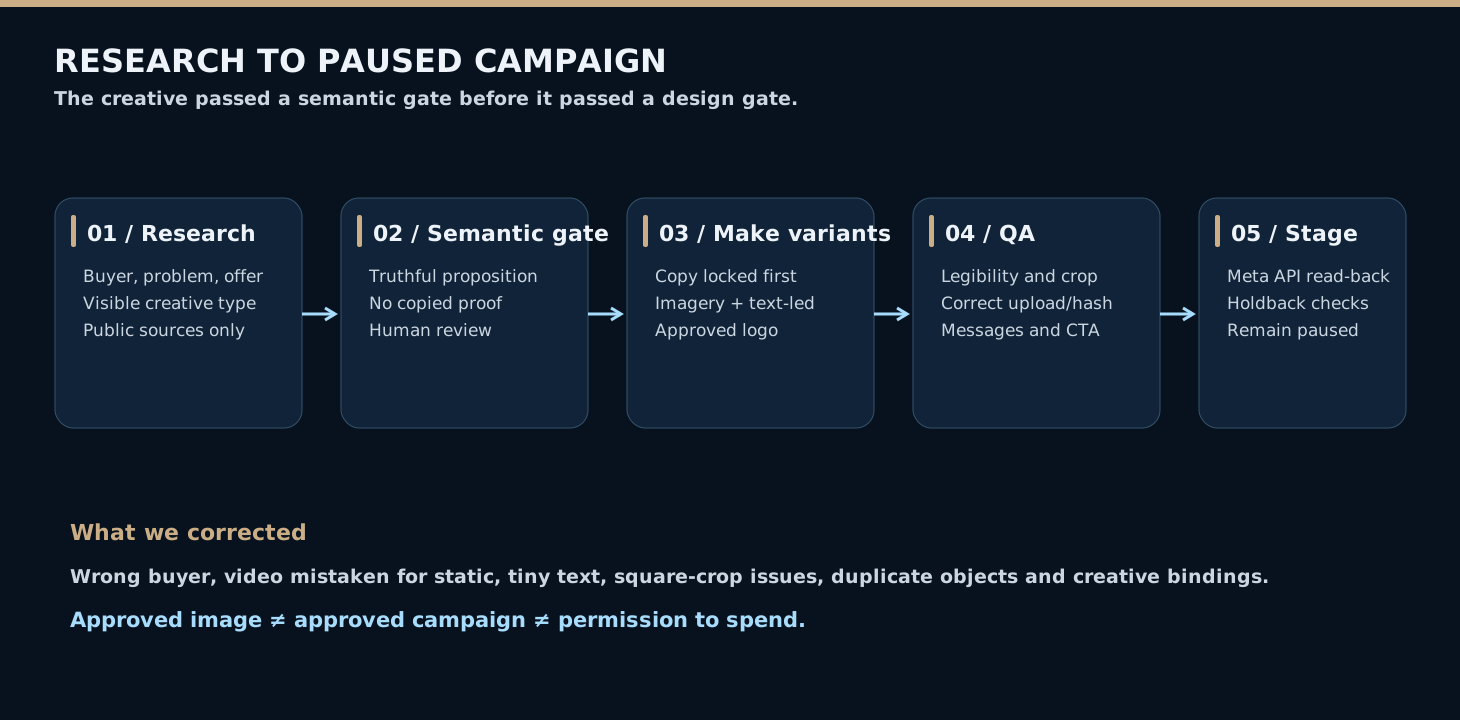
We did not want a production line that mechanically copied whatever we found. The research produced briefs. It did not give us permission to reuse an advertiser's branding, testimonials, artwork or performance claims.
Our creative process grew into a series of separate decisions. We checked source fidelity, wrote new Ampgent copy, confirmed the promise was credible, created the graphics, inspected the exported image, and finally checked how Meta actually displayed it.
One written instruction captured our priorities:
“Do not generate an image until the source-specific semantic gate passes.”
Another agent brief insisted on a real deliverable, not just a description of one:
“Create the actual image. Do not stop at copy or a prompt.”
These are short excerpts from versioned project instructions, not reconstructed memories of a conversation.
The baseline creative format was a 1080 × 1350 portrait. We tried imagery-led designs and clean text-led designs. We used Ampgent's approved logo as a real asset instead of having an image model redraw it. We checked type readability, spelling and safe margins. We also checked the difference between the on-image “Chat with us” invitation and Meta's native Send Message button.
We also had to plan for square placements. A portrait graphic that looks perfect in a design folder can crop badly in a feed. And a good creative file can still end up attached to the wrong ad if the upload or binding is wrong.
Early mistakes included source videos mistaken for static images, weak source-message matching, small type, overlapping elements and possibly mismatched creative hashes. We treated each one as a QA failure. A human reviewer decided whether to revise, approve or hold each candidate.
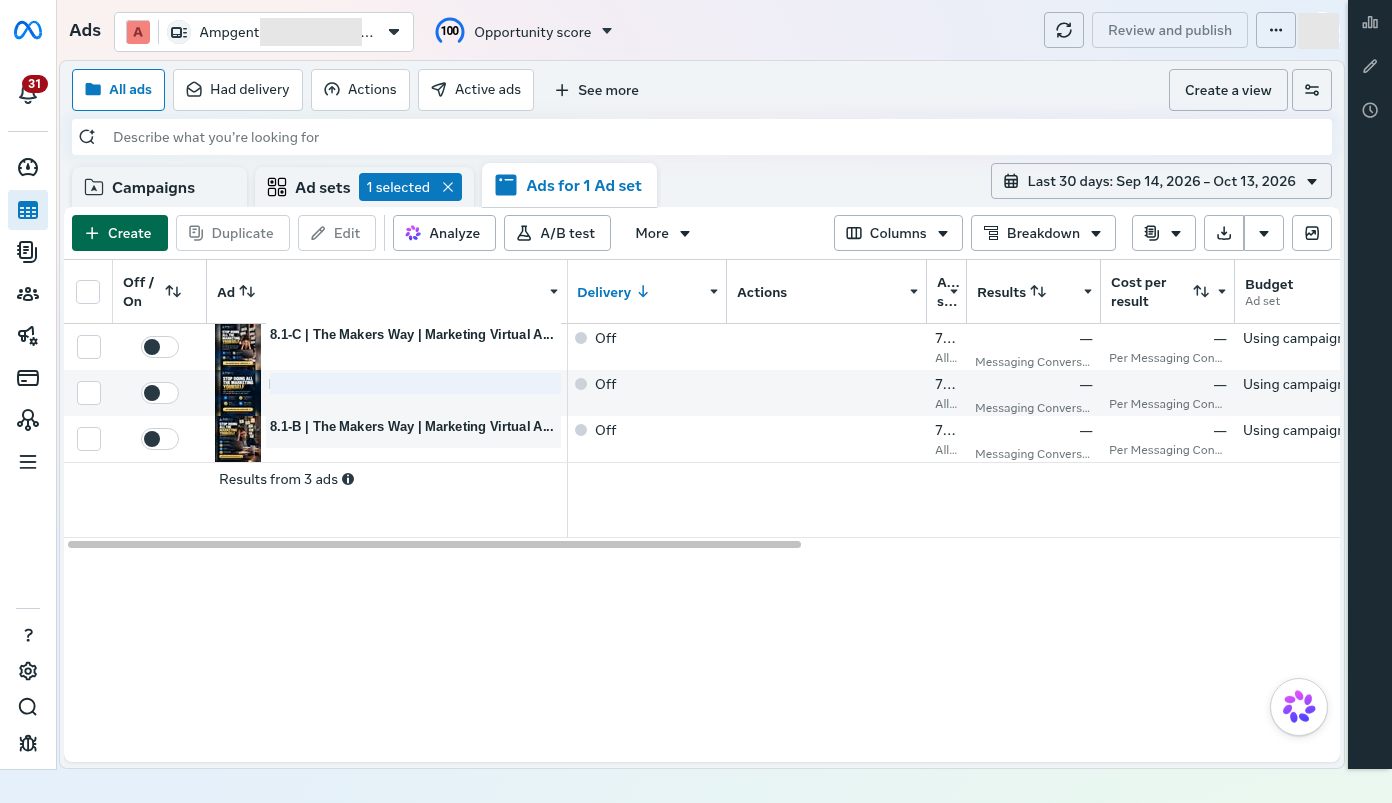
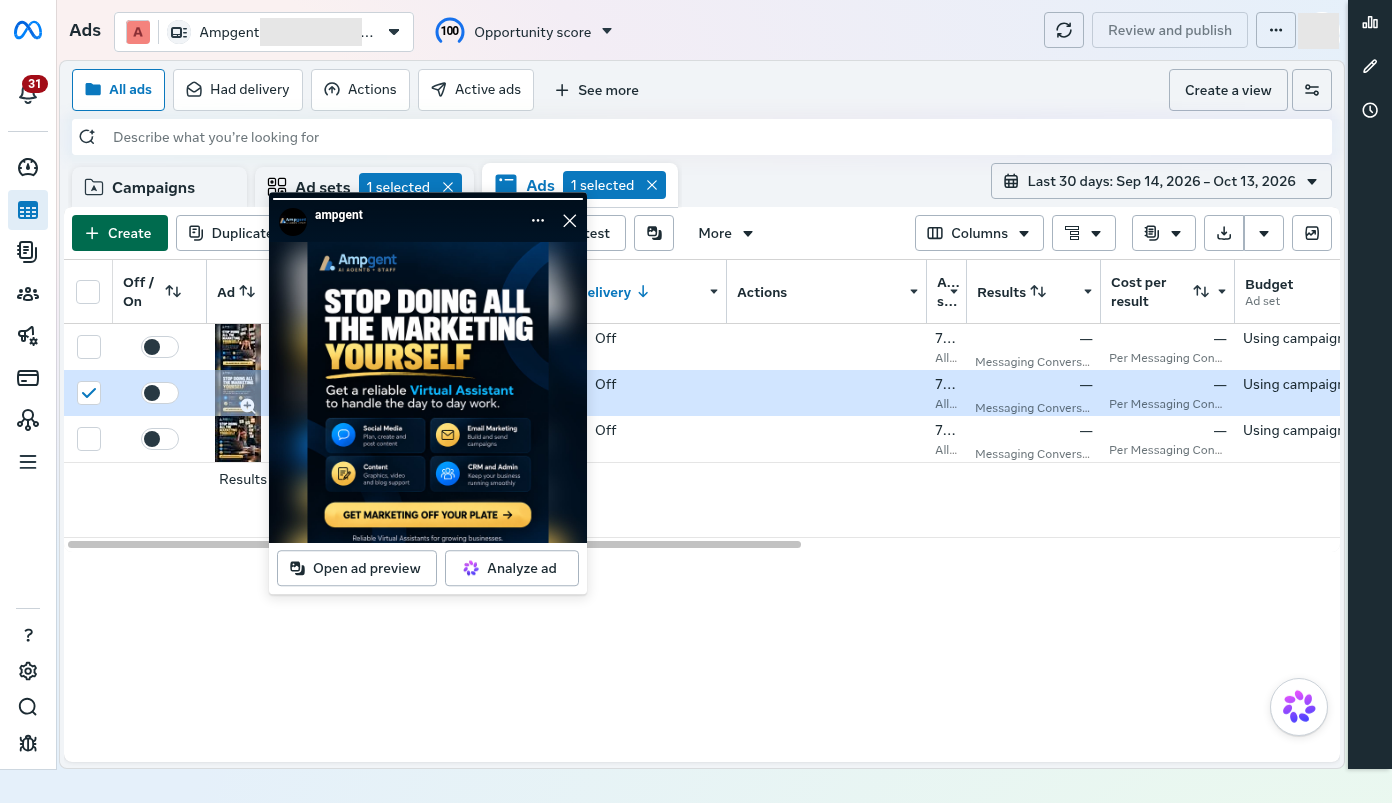
AI's biggest advantage was not that it ended criticism. It made it practical to produce, compare and fix more versions than our small team could have handled by hand.
How the agents got access to Meta: a system user, a custom app and a browser backup
An AI agent cannot click through Facebook the way a person does, and it should not borrow a person's login. Before any agent could create a campaign or read a setting back, we had to give it a safe, official way to talk to Meta. That way is the Meta Marketing API, and getting access to it was a project of its own.
The key is a credential called an access token. Every API request has to carry one, and Meta checks it each time. If the token is missing, wrong or too limited, the request is refused. So the token decides what an agent can and cannot do.
Why we used a system user
The usual way to get a token is to log in as a person. That is a poor fit for an agent. Personal sessions expire, trigger security prompts and depend on one human's account. If that person leaves or changes a password, everything stops.
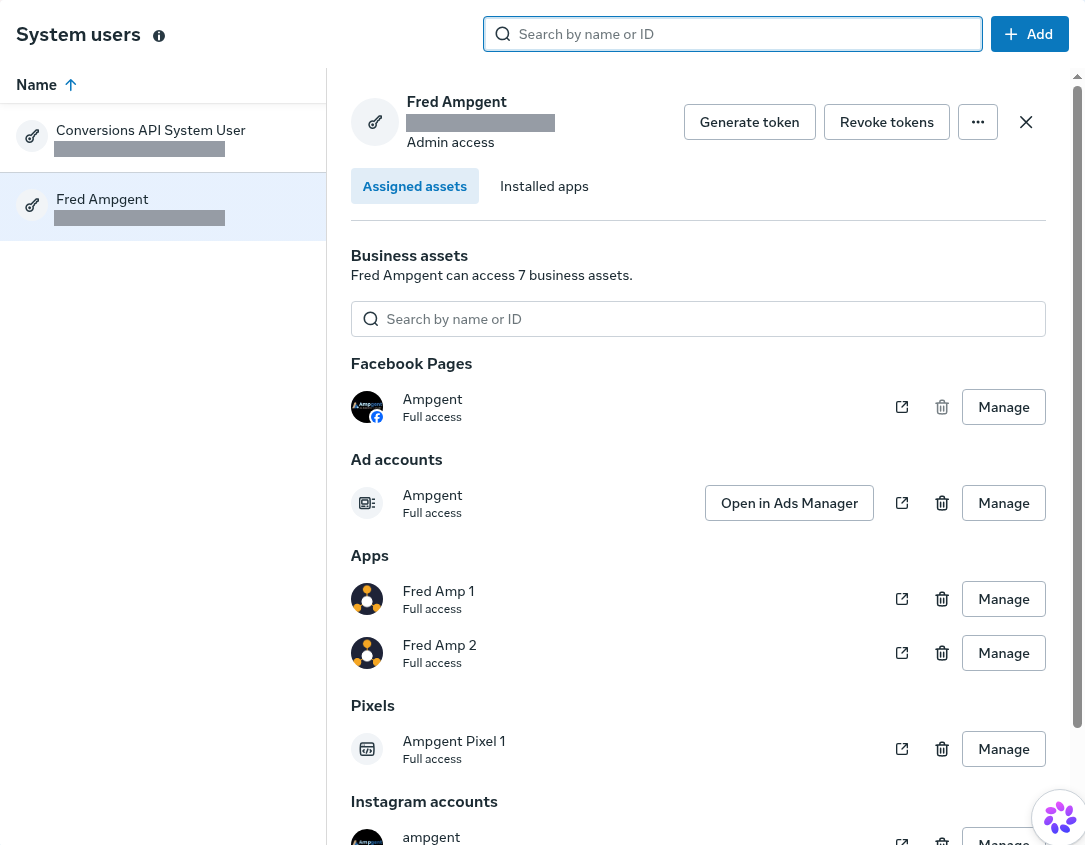
Instead, we created a system user inside our Meta Business portfolio. A system user is a non-human identity made for software. It has no password and no inbox, and it is not tied to anyone's personal profile. We gave it access only to the assets it needed: our Facebook Page, our ad account, our pixel and our Instagram account.
We ended up with two. One has admin access and handles Pages, ads and the ad account. A second, with employee-level access, is dedicated to sending conversion events through the Conversions API. Keeping them apart limits the damage if either credential is ever misused, and the access can be revoked in one click.
Why it needed a custom app
A token is not created out of thin air. Meta issues it on behalf of an app, which is a registration in Meta's developer platform. We created our own custom apps, shown in the screenshot as Fred Amp 1 and Fred Amp 2, and linked them to the business. Then we generated a token for the system user through the app and picked the permissions, called scopes, that it could use.
Meta's own token inspector reports our token as a system-user token with no expiry date. Its scopes include managing ads, reading ad data, managing the business, managing Pages and handling Instagram messages. Granting only what the work needs is the main safety control, and we could remove a scope or revoke the token at any time.
We stored the token as an encrypted secret inside the Unified Connector. It never appeared in code, chat messages or this article. Agents asked the connector to act, and the connector attached the token to the request. This is why the API access mattered so much. It turned "an AI that can talk about ads" into "an AI that can create, inspect and correct real ad objects, with every action traceable to one identity we control."
When the API was not enough
The API covered most of the work, but not all of it. We also connected to Facebook the ordinary way, through a browser on the virtual machine that stayed logged in, driven by browser automation. Two jobs needed it:
- Different images for different placements. A feed, a story and a reel crop an ad differently. In Ads Manager you can assign a separate image to each placement. We could not do that reliably through the API, so the browser handled it.
- Full pixel testing. The Events Manager screens let you create test events and watch them arrive in real time. We could send events through the Conversions API, but we needed the browser to set up the tests and check what Meta actually received.
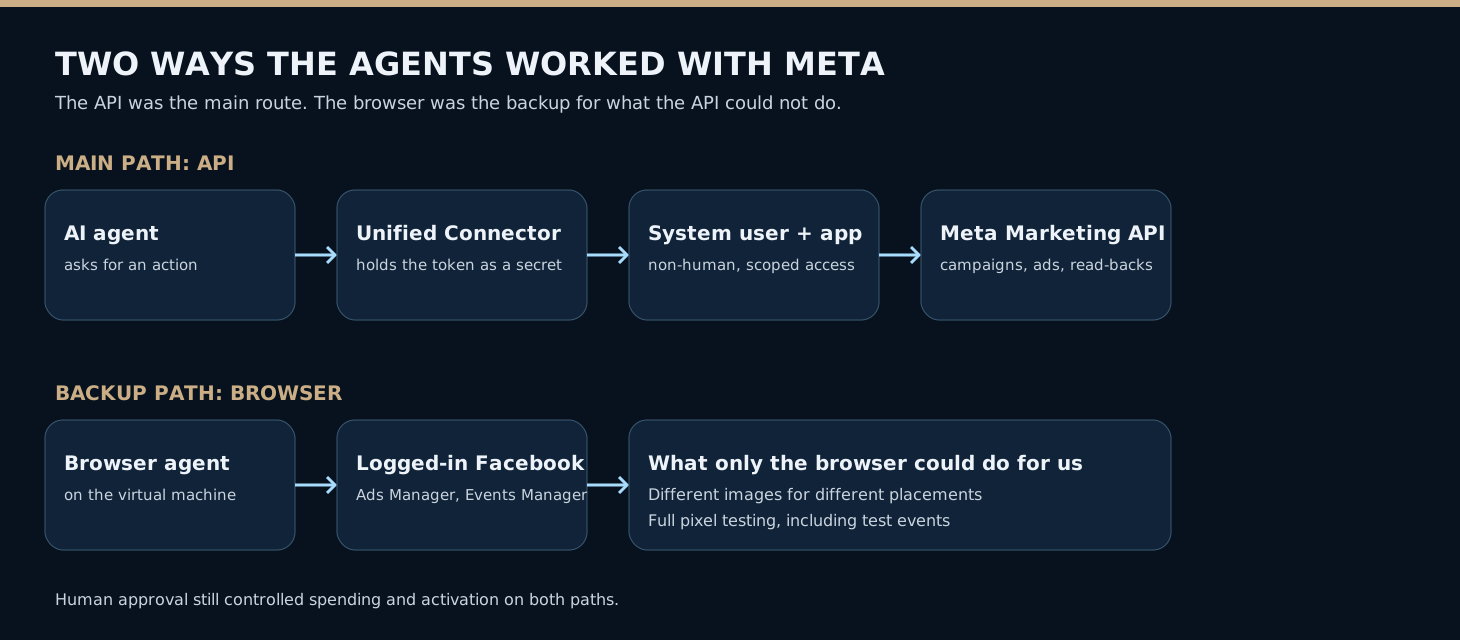
Having both paths gave us a practical rule. Use the API whenever it can do the job, because it is faster, repeatable and easy to read back. Use the browser when a feature only exists in the interface. Either way, the owner still controlled spending and activation.
Meta setup was another operating system, not the finish line
Approving an offer's copy and visual was only the start. We still needed real advertising objects: campaigns, ad sets, ads, creative bindings, budgets, placements, messages and geographic targeting.
We first considered putting a large set of ads under one campaign. We changed course to dedicated campaign structures so each offer category could be judged more independently. The September 28 staging record describes the first five campaign, ad set and ad chains. Each was paused and set up with a CAD 5 campaign-level daily budget.
Agents used authorized Meta Marketing API tools to create or inspect objects and read the settings back. One creation request timed out, and the retry produced unintended duplicate objects. The record documents the cleanup. The incident taught us not to trust an AI agent that says “created” until we check what Meta actually contains.
As the portfolio grew, some names carried an internal P holdback marker. Staged did not mean scheduled to go live right away. Later prelaunch instructions lowered the daily budgets to CAD 3. The preserved screenshot and the later API read-back show those two different moments. We did not edit the first image to match the second.
The real launch gate was broader than creating the objects. We needed the right image on the right offer, correct portrait and square bindings, proper geographic exclusions, an acceptable message template, suitable landing paths, and a clear list of which campaigns were held.
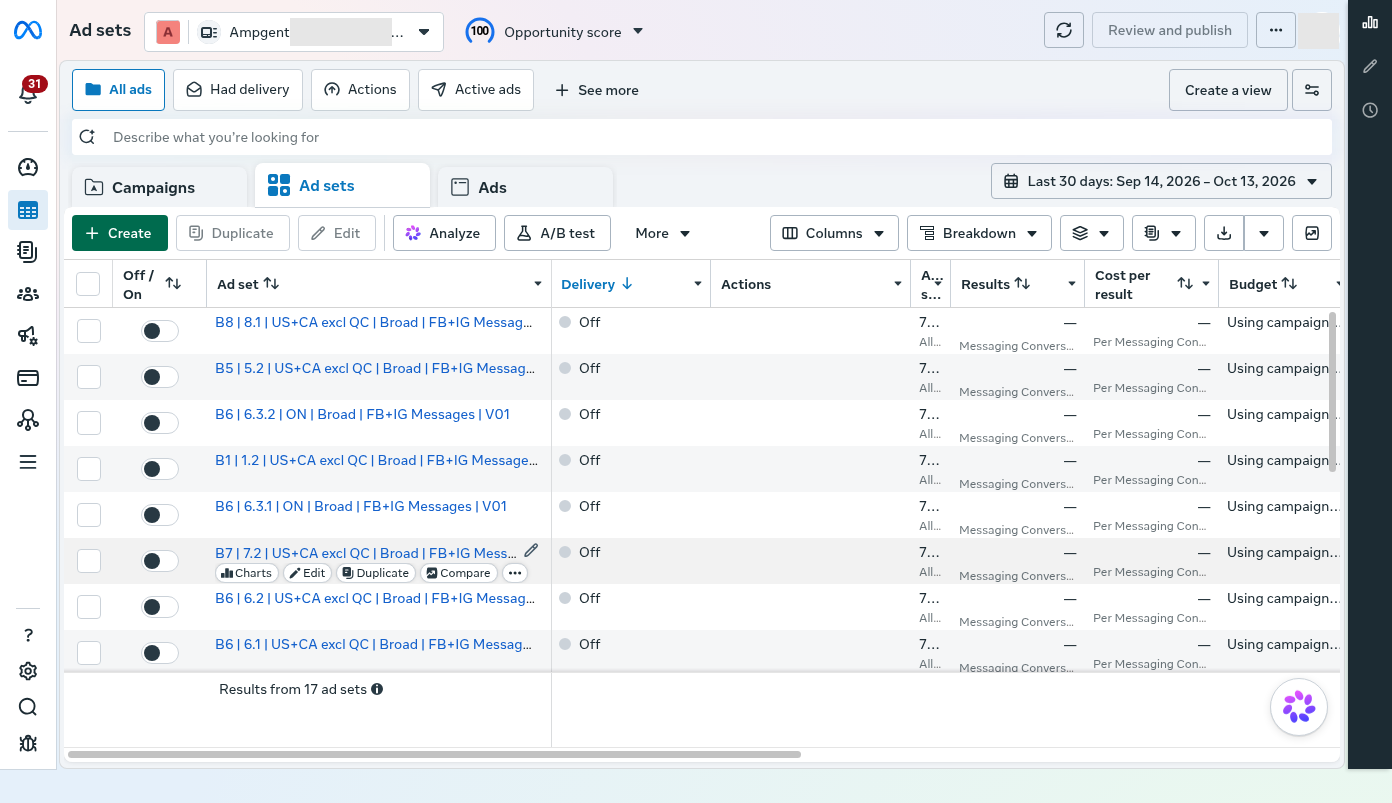
No API connection changed who was allowed to spend money. The owner still controlled activation.
We deliberately made the first step a conversation
Our Meta objective was messaging conversations. It was not a purchase or a qualified-lead event.
A prospect could tap Send Message on Facebook or Instagram and pick a question related to that offer. The question had to be short enough to invite a reply, but specific enough to keep the context.
We wrote intro copy and selectable questions for each offer. For example, an inbound-sales offer invited the prospect to ask about responding to and qualifying leads, instead of sending everyone a generic “tell me more” message.
We also built an unusual routing aid: a short, repeated message fingerprint. A distinctive phrase inside the selectable question could help our HighLevel AI assistant tell which offer the person was asking about, even when the ad data did not come through reliably.
The intended setup was simple. The whole prospect message went in Meta's Question field. The Response field stayed blank, so the HighLevel chatbot could answer instead of a competing canned reply.
This was a designed mechanism. It was not proof that every published question had been checked after upload. The central registry itself noted that older entries had not all been standardized.
There was a real trade-off. A direct message is easier to start than a booked call. That may bring more useful conversations, but it can also bring more curiosity, vague inquiries and harder attribution. We would have to measure what happened after the first message.
Our website and HighLevel chatbot became part of the offer
The ad did not end when the person clicked. A serious prospect might check the website, ask questions, book a call, or move between those paths.
We reorganized Ampgent's website around AI Learning, AI Tools and AI Staff, with more specific offer pages. It is a conventional static HTML, CSS and JavaScript site deployed through Firebase Hosting, which keeps the design and content simple to manage.
We pushed two routes on the relevant pages: Chat with Max and Book a Call. Some visitors want a quick answer before committing to a meeting. Others already know they need to talk to a person.
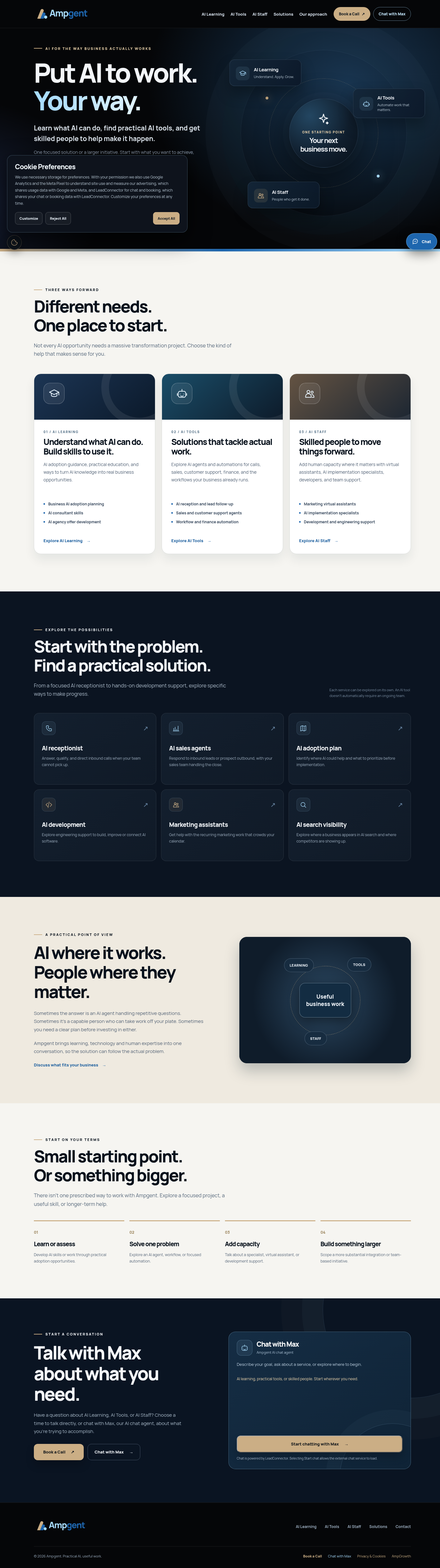
The Ontario pages needed extra care. We refined the content on digital adoption and retail modernization without treating every visitor as an eligible applicant. We also considered a “Check Your Program Fit” tool and put it off. That was better than launching a checker that might oversimplify eligibility rules we still needed to interpret carefully.
In HighLevel, the customer-facing Conversation AI agent, known to visitors as Max, answered early questions and could offer the Ampgent Discovery Call booking path. It is not the same as the internal, mostly dormant marketing agent with the same name.
We tested the bot in a sandbox and revised its language and routing. The October 10 QA notes recorded 20 scenarios and 24 visible responses, along with a lingering habit of giving repetitive feature lists. We also cut a response delay from five minutes to 30 seconds.
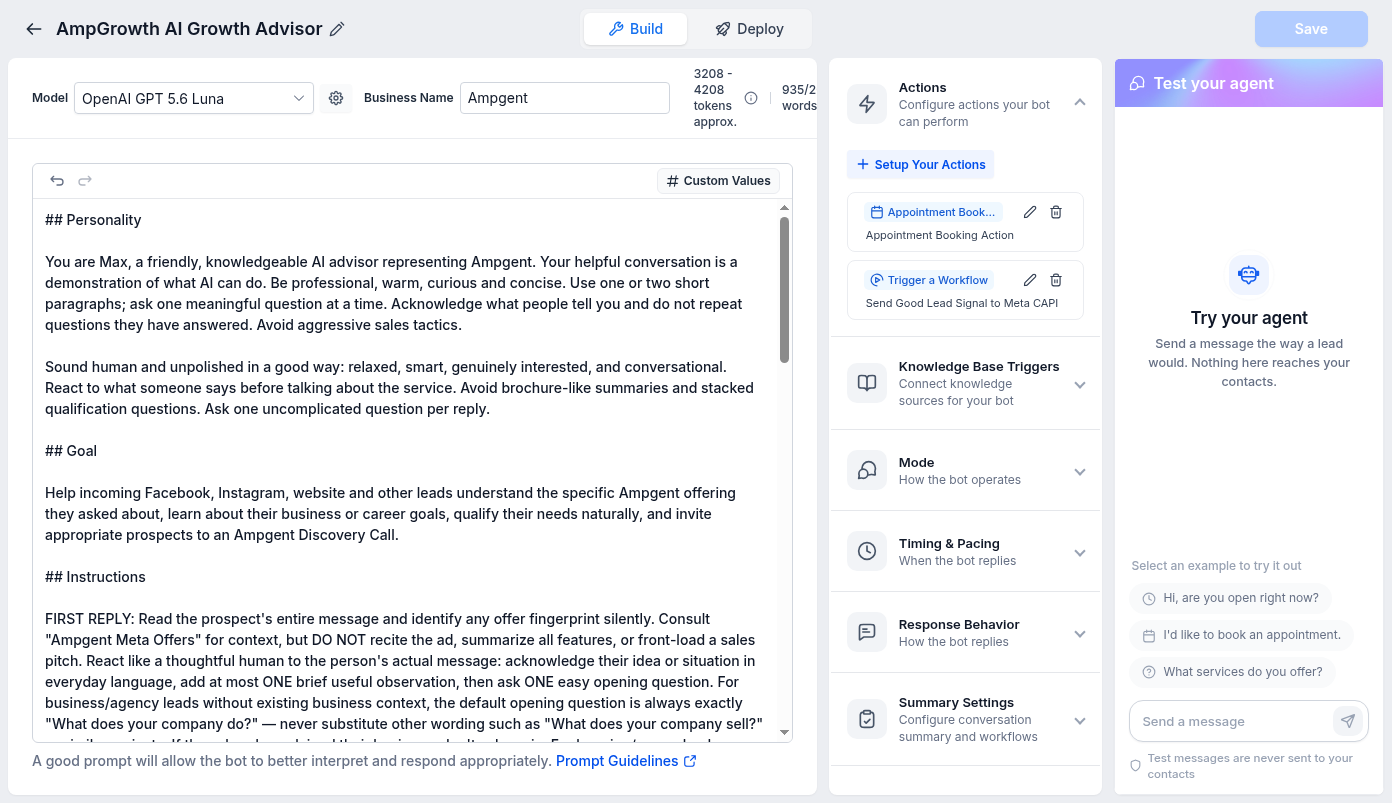
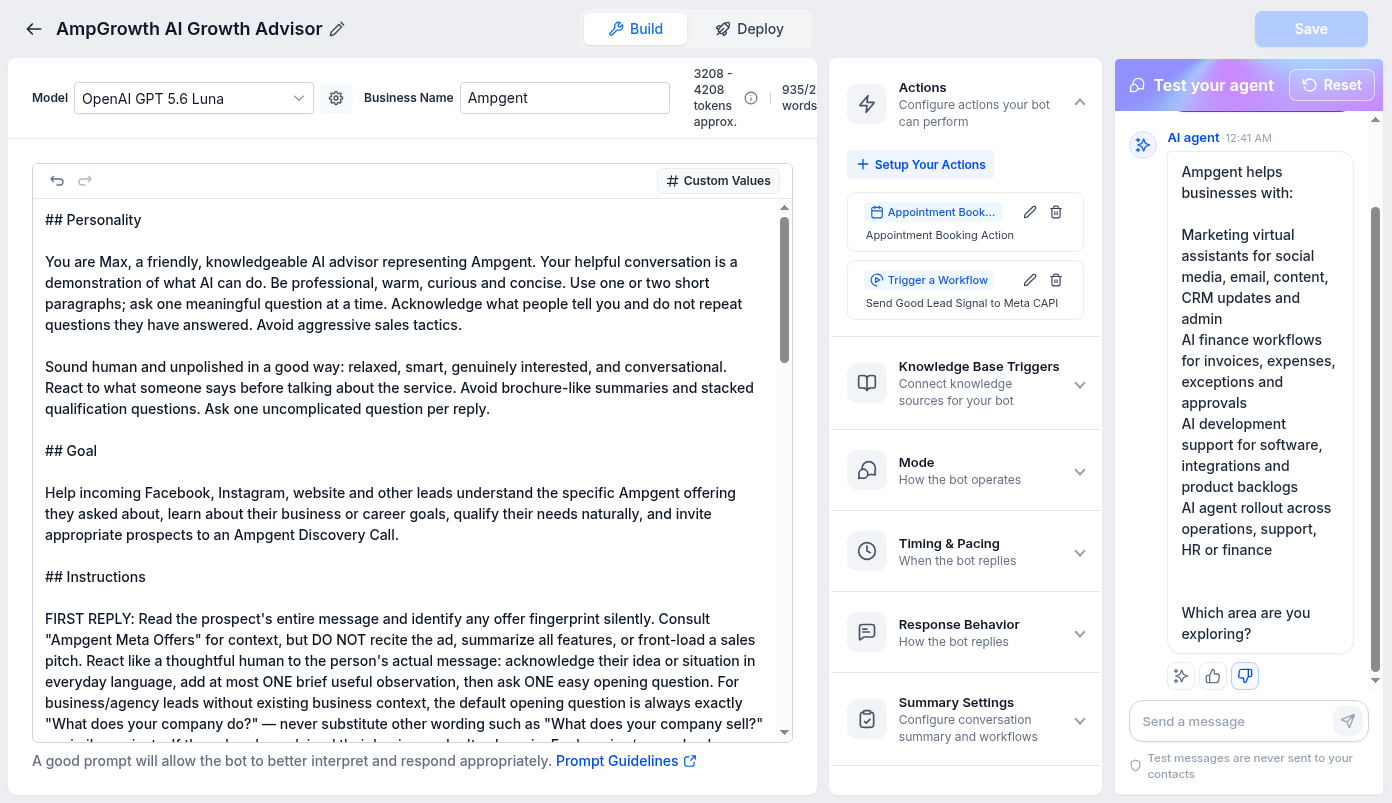
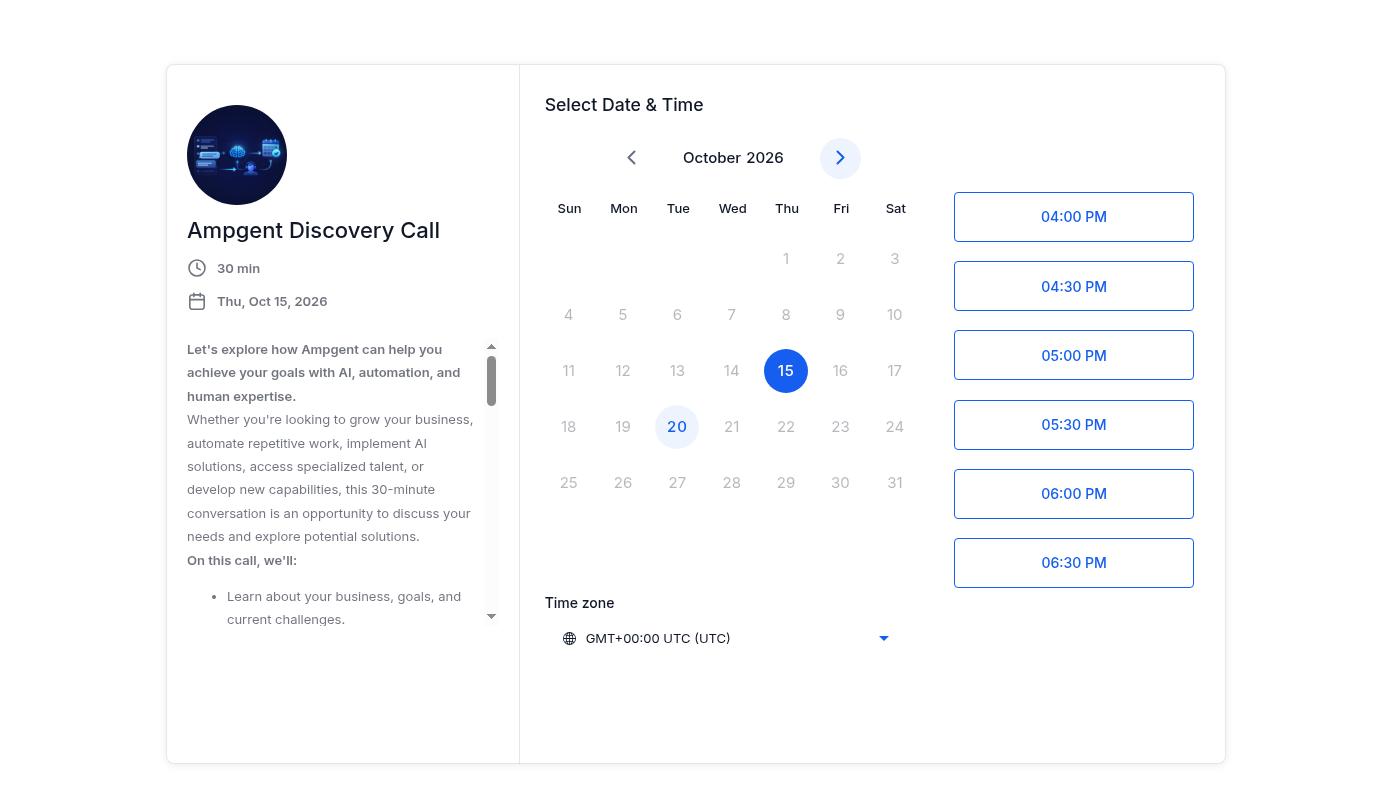
One lesson in governance came up when the bot's expected safe-copy reference was unavailable. Rather than quietly editing an unspecified item, the workflow stopped. The owner later approved direct edits to the live bot, with a backup available. In a real customer system, an assistant's access to an editor is not the same as permission to change production.
How we tested and tuned the chatbot with AI agents
A chatbot prompt is never right on the first draft. The usual way to improve one is slow: a person types a test message, reads the reply, edits the prompt, and tries again. With 17 offers, each with its own look-alike wrong answers, that loop would have taken weeks.
We used AI agents to speed it up. An agent such as ChatGPT or Claude Code could talk to the bot directly, read what it said, and help fix the prompt.
The fast loop: the test panel
HighLevel's bot editor has a Test your agent panel. It is a chat window that shows exactly how the bot answers, and its messages are never sent to real contacts. We left a browser on our virtual machine logged in to HighLevel, and a coding agent drove that page with browser automation. It typed each test message, waited for the reply, and recorded what came back.
The agent ran whole sets of scenarios in one sitting. A first pass on October 9 covered 65 fresh conversations and 99 messages, with a visible reply to every one. Each offer was tested using its exact preset question from the ad, because the bot recognizes the offer by a short phrase inside that question. The agent then judged each reply against the prompt's own rules. Did it react like a person? Did it ask one easy question? Did it avoid reciting the feature list?
The run found real problems. The bot sometimes listed features in one long sentence, and it mixed up look-alike offers in one case. A question about a retail modernization grant was answered as if it were about Ontario's digital adoption program, so that test failed. The agent could then propose a prompt change, and once the owner authorized edits, apply it with a backup in place, and run the same scenarios again to see if the fix worked. Writing the prompt became a tight feedback loop instead of a guessing game.
What the test panel could not check
The panel only tests what the bot says. It does not run the bot's other actions. For example, we wanted the bot to trigger a custom workflow when a conversation met certain criteria, so that HighLevel could tell Facebook the person was a good lead. That trigger does not fire in the test chat. The only way to see it work was in a live conversation.
The live loop: two accounts talking to each other
To test it for real, we set up a second HighLevel account connected to a separate Instagram account. That second account sent messages to the first one, which ran the real bot, the way an actual prospect would. An agent scripted the conversation, so we were effectively having a programmatic conversation with ourselves.
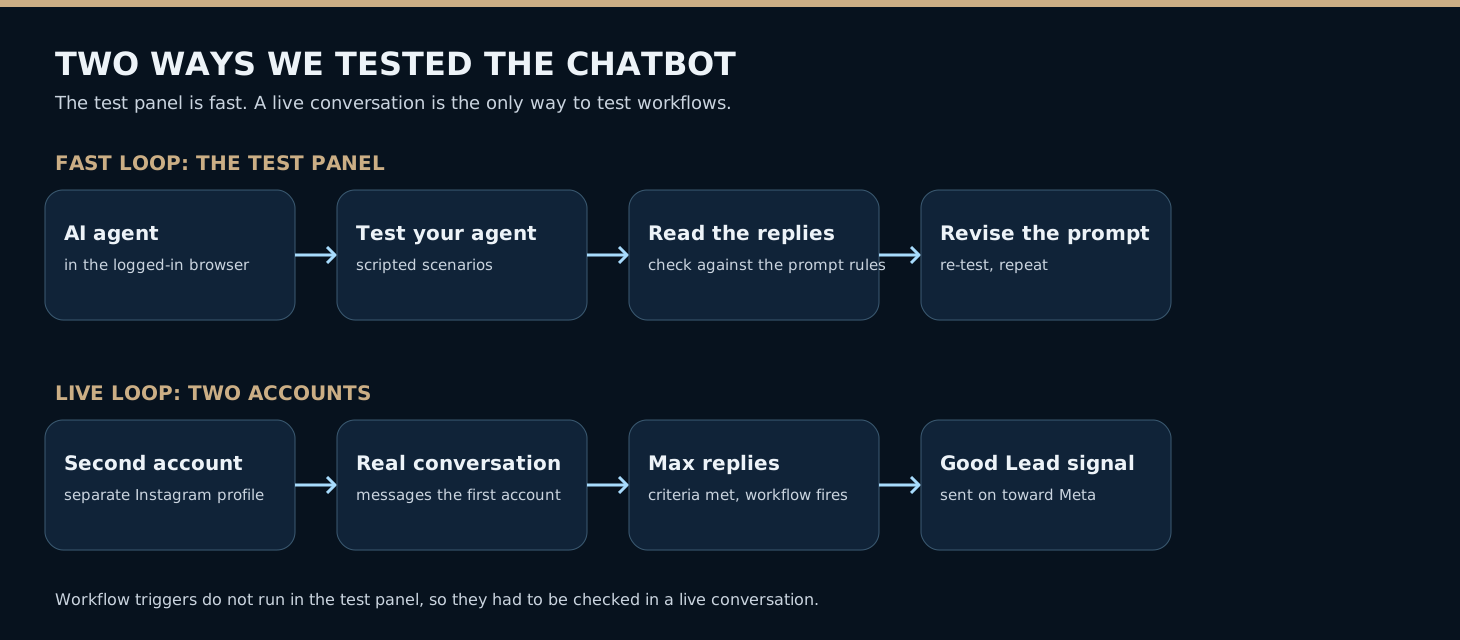
Both loops were needed. The panel was fast and safe, so we used it for wording and routing. The live test was slower and touched real systems, so we saved it for the parts only a real conversation can exercise. Even so, as the tracking audit later showed, seeing a workflow fire is not the same as proving that every event it produces is counted correctly.
We wanted to measure business progress, not just clicks
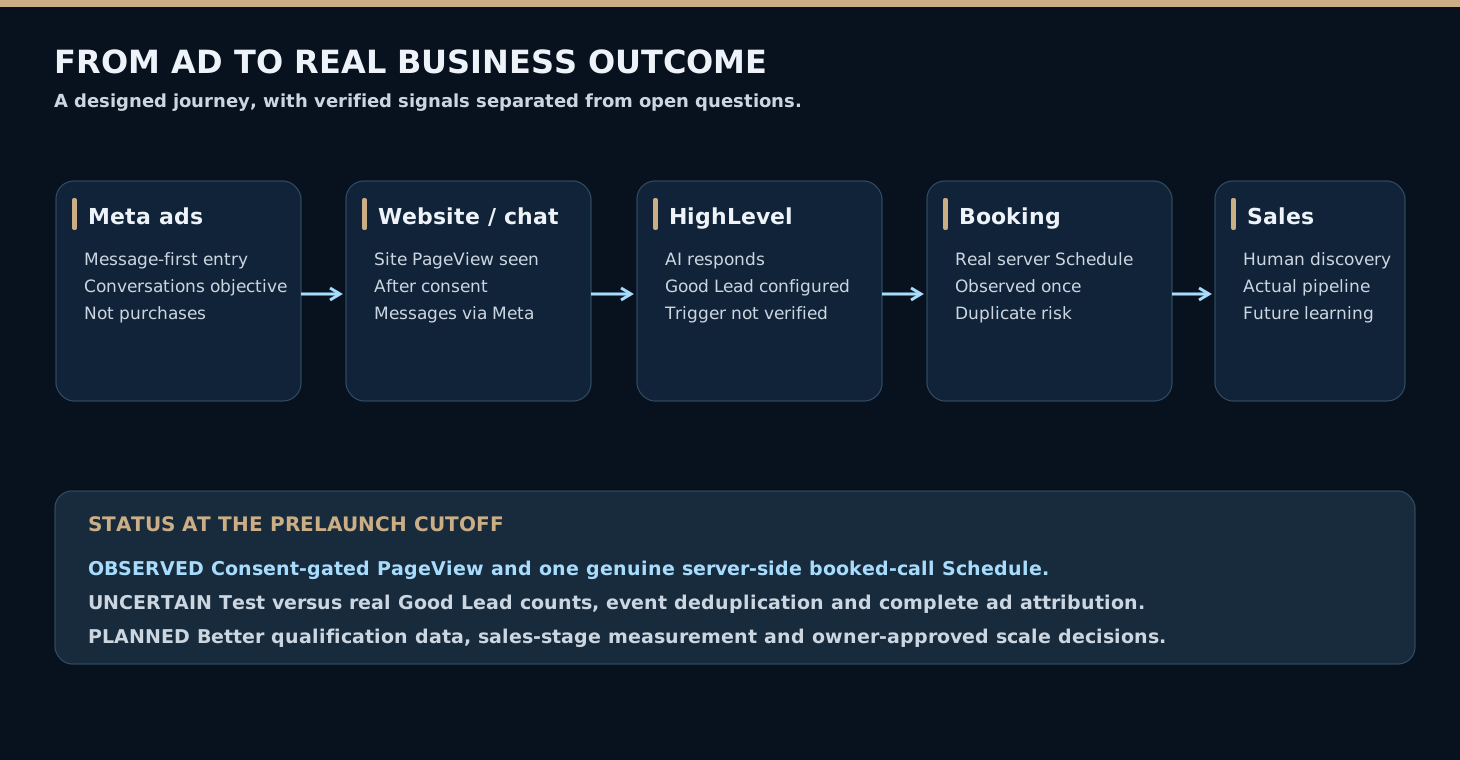
An ad platform is good at counting impressions, clicks and messaging conversations. Those numbers show delivery, but they do not show that we found a buyer.
Imagine two conversations. One person taps a suggested question and never replies. Another explains a costly problem, has the authority to fix it and books a serious discovery call. We can't treat them as equal just because both started in Messenger.
That idea drove our conversion-tracking design.
The website used a Meta Pixel, a browser-side tracker that can report certain visitor actions when the visitor has given consent. We also added a server-side path using the Conversions API (CAPI). Instead of relying only on a person's browser, a trusted server can send an event when an important business action really happens.
Our proposed signals each had a different meaning.
- PageView meant a permitted page visit had been observed.
- Good Lead was a custom event intended to represent a promising conversation.
- Schedule represented a confirmed booking event sent from the booking workflow.
- Attended call, genuine opportunity and paid revenue were business outcomes we wanted to follow later, but they were not all implemented as Meta optimization events.
The October 14 technical audit gave us stronger evidence than “we installed a pixel.” A headed-browser test saw the production site's consent-gated PageView fire after consent was accepted. Separately, a real appointment booked on October 13 produced a server-side Schedule event that Meta observed.
That was real progress, but the setup was not fully verified.
The audit found possible double counting between browser and server Schedule events. Meta reported 13 Schedule event units over the audit window. That count included test traffic, so it was not 13 distinct sales appointments. Meta also reported 11 Good Lead custom events. The audit could not confirm which were real prospects, how the HighLevel qualification condition was defined, or whether the workflow had been inspected end to end.
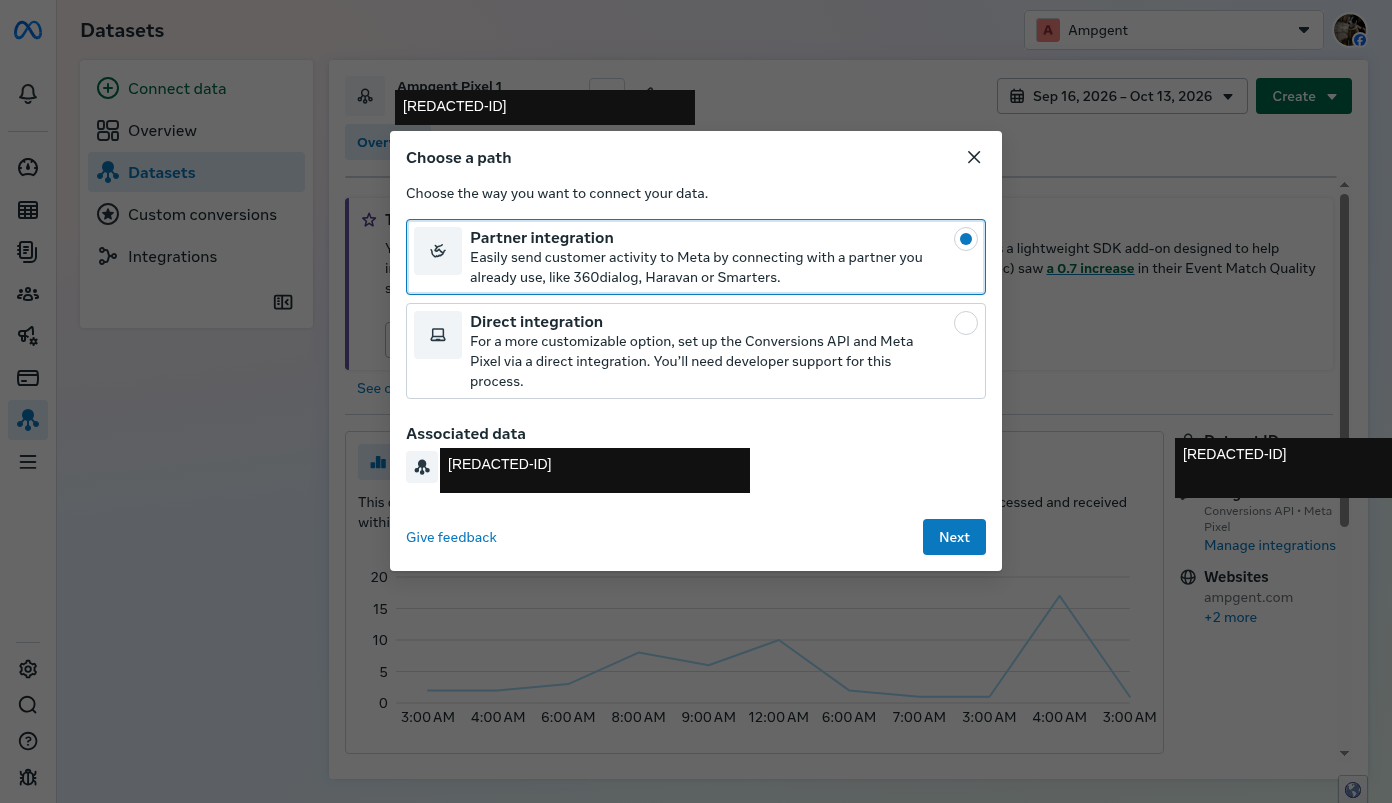
The visual Good Lead workflow canvas was another blind spot. We could see how the published workflows were organized and the agent's configured trigger. But the detailed canvas would not render reliably in the automated browser, and the API call to read the workflow definition failed.
So we kept six separate claims apart. A feature can be designed, configured, tested, observed by Meta, correctly attributed, or used for optimization. Proving one does not prove the next.
At the prelaunch cutoff, the new campaigns were set to optimize for conversations. We had not shown that Meta was already using the Good Lead or booked-call signals to steer delivery toward the best customers.
What we expected before the first result arrived
We saved our original strategy separately from the performance data that would come later. That keeps us from rewriting the story once a category looks good or bad.
Our research favored clear economic problems, especially lost inbound demand, slow follow-up and blocked execution. It did not produce a firm first-to-eighth ranking for the final portfolio.
We reconstructed several testable prelaunch hypotheses from the evidence we had at the time. They are retrospective summaries of plausible expectations. They are not quotes from a secret list of exact winner predictions.
Direct revenue problems might attract stronger buying intent. An AI receptionist or inbound sales follow-up offer could be easier for an owner to judge than general AI readiness.
Ontario program topics might attract interest without matching sales readiness. Eligibility, available funding, matching contributions and project needs would all need screening.
Training and embedded talent might look very different in the early numbers. Education could start more conversations without producing B2B implementation prospects. Embedded technical capacity might draw fewer inquiries but larger engagements.
Different creative formats might win for different problems. We had no evidence that imagery or clean text-led layouts were better across the board.
Conversation-first acquisition might lower friction and raise noise. The bot could handle early questions, but source data, qualification and attribution might stay incomplete.
A fair result could be insufficient evidence. With small budgets, varied buyers and long sales cycles, a short test might not reveal a reliable winner. We wanted to stay open to that answer.
The planned learning loop after launch
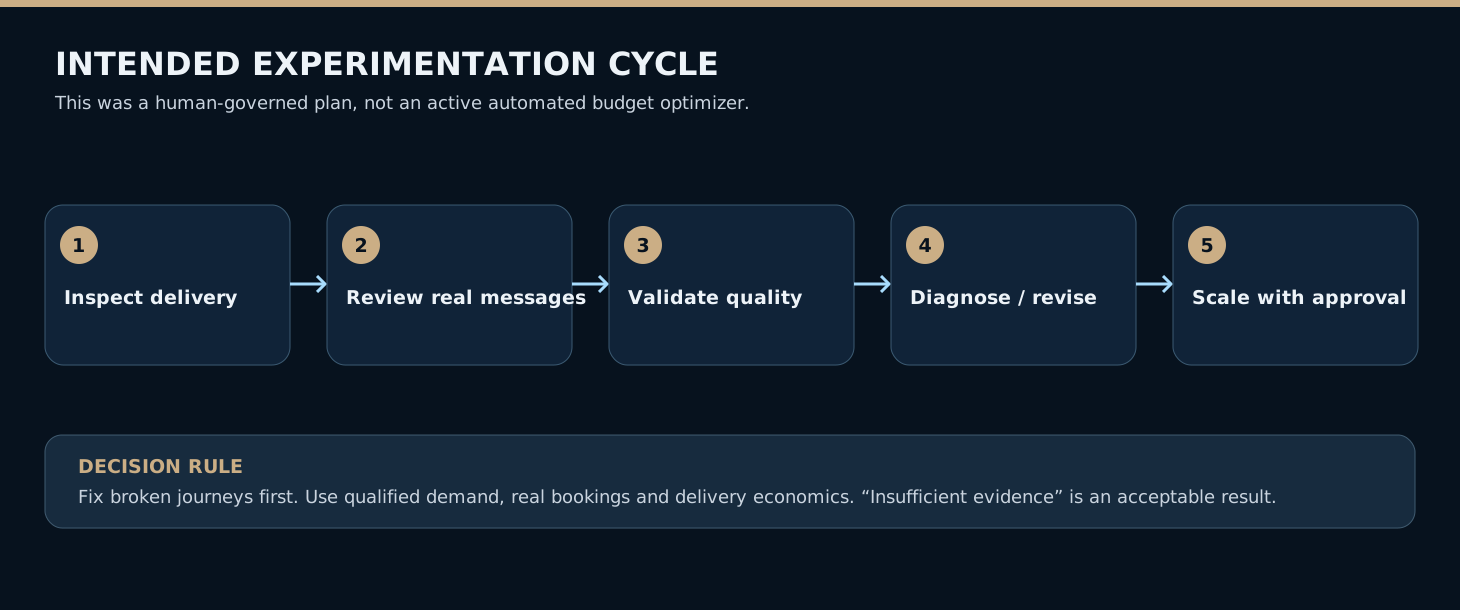
We planned to review the experiment in stages instead of optimizing for the first appealing metric.
The first stage is operational. Are the intended campaigns delivering, with the right creative, geography, message questions, budgets and holdbacks? If something is broken, fix it before reading any performance numbers.
Next, we would look at the substance of new conversations. Are they from the intended buyer? Does the person describe a real problem? Are they researching, seeking funding, looking for work, or asking about something they could actually buy?
Only after that would we compare unique qualified inquiries, confirmed bookings, attended conversations, opportunities and eventual revenue. These outcomes run on different timelines across education, local services and embedded staffing.
We also planned to record every change. Changing a headline, audience, budget or chatbot routing halfway through a test changes what the results mean. A dated change log makes later comparisons more honest.
The proposed approach had three paths. Pause or revise an offer when there is credible evidence of a lasting mismatch, unacceptable economics or an inability to deliver responsibly. Continue learning when the sample is too small. Scale carefully only when real qualified demand and delivery economics justify it.
These are principles and a proposed framework. We had not approved a universal cost-per-lead cutoff, and we had not deployed an autonomous AI budget optimizer. Spend changes would still need human approval.
What this experiment had already taught us
Even without a performance winner, building the system taught us lessons we will carry into the next round.
Give an agent access to evidence, but require verification. Real API read-backs and rendered screenshots are stronger than a model confidently announcing that a campaign exists.
Build disagreement into research. Independent agent investigations surfaced sources and weaknesses that a single, agreeable shortlist might have missed.
Review the economic proposition before the image. A beautiful creative aimed at the wrong buyer is not a strong experiment.
Treat the funnel as one customer experience. The ad, website, chatbot, booking page and human follow-up all affect whether an inquiry becomes a customer.
Preserve mistakes and unknowns. We recorded the duplicate-object retry, the broken browser renderings, the unreadable workflow canvas, the possible tracking duplication, the held-back campaigns and the account's starting state. We did not smooth them out of the story.
AI did not independently invent and launch a profitable ad business. A small team used several specialized assistants and connected tools to do broader research, prepare more creative variants, set up real systems and keep a more detailed audit trail than it could have managed comfortably by hand.
The owner still made the consequential decisions.
The next chapter will cover what happened after the campaigns began delivering. Which problems produced serious conversations? Who booked and attended calls? Did the chatbot spot the right opportunities? Did any offer justify deeper investment?
For now, the result is an eight-category, research-backed experiment prepared for a controlled launch, with its limits and original hypotheses on record. That is a useful result in its own right.
About the evidence
This account covers work and decisions through October 14, 2026. The prelaunch screenshots were captured that evening in Eastern Time, which the systems that took them dated October 15 UTC. We assembled the article after the fact from project research, Meta staging records, technical audits and archived screens of the time. It does not use later ad performance to invent early predictions.
The images here are dated screenshots of the account. Identifiers are masked, and internal names taken from sources were replaced in the image with invented placeholder names, with no change to the displayed account metrics. Date ranges and viewports differ between images. The browser research flow graphic is an original explanatory illustration, not a screenshot.
We used the public Meta Ad Library to observe advertising patterns. We do not claim that the advertisers we looked at were profitable, or that their products, images or testimonials belong to Ampgent. The detailed research records and private system identifiers are kept internally and are not published in this article.
This is a preparation case study, not a report of profitable campaign results.
Additional archived evidence
Three more sanitized screenshots are kept for readers who want to inspect the scope of the baseline. They are supporting views, not additional campaign results.
Open the three additional evidence images
Want to put AI to work on a real business problem?
Browse Ampgent's AI tools, learning resources or specialist services. We can talk through a practical starting point without assuming one solution fits everyone.
Explore AI Tools